
How Crypto Hardware Wallets Work: What to Compare Before Buying
I see people search for “hardware wallets crypto” and then get buried in long product lists. The core idea is much simpler. A wallet does not normally hold coins, tokens, or account balances; those are recorded on a blockchain. What the wallet holds or manages is the key material that proves control and signs transactions.
The key roles
- A public key works like a receiving address and can be shared.
- A private key authorizes spending and must stay secret.
- A seed phrase can restore the keys and accounts created from a master seed.
- A hardware wallet keeps or uses private keys inside a dedicated device.
Not your keys, not your coins.
Self-custody means you control the keys, but it also means you own the job of backing them up and using them safely. An exchange can freeze withdrawals or lose access to its keys. A hardware wallet can reduce the chance that malware reads a key from a phone or browser, but it cannot protect a seed that you photograph, lose, or use to approve a bad transaction.
Hot Wallets, Cold Wallets, and Hardware Wallets
The question what are crypto cold wallets has a short answer. Hot wallets connect to the internet and suit frequent online activity. Cold wallets keep key generation and storage outside an internet-connected setting. Crypto cold storage can use a hardware device, an air-gapped device, a paper backup, or a qualified custody system.
Hot and cold storage at a glance
- Hot wallets are usually apps, browser extensions, web apps, or exchange accounts.
- Hot wallets are easy for trading, payments, dApps, and frequent transfers.
- Hot wallets face malware, phishing, fake updates, malicious extensions, and compromised apps.
- Cold wallets are meant to keep keys away from routine online activity.
- Cold wallets still face theft, loss, damage, coercion, supply-chain attacks, and user mistakes.
- Both types can depend on a seed phrase or another valid recovery method.
Hot wallets trade isolation for easy access. Cold wallets trade convenience for fewer online paths.
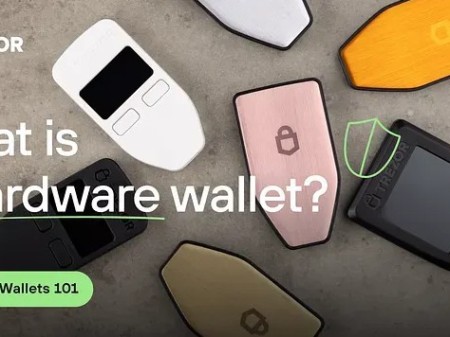
A cold cryptocurrency wallet can be more than a boxed device. Common examples of cold wallets in crypto include Ledger, Trezor, KeepKey, BitBox, Coldcard, Keystone, and Tangem. Paper can keep a key away from a computer, but using it often means moving the key into an online setting. Hardware keeps the key inside the device while it signs.
How a Hardware Wallet Signs a Transaction
Think of a hardware wallet as a small signing computer. Your phone or computer prepares an unsigned transaction and sends it to the device. The hardware wallet checks what it can display, asks for local approval, signs with the private key, and returns the signed transaction. The host then sends that signed transaction to the blockchain.
The usual transaction flow
- Connect the wallet by USB, Bluetooth, NFC, or another supported method.
- Use the companion app to choose the account, network, recipient, and amount.
- The app sends unsigned transaction data to the hardware wallet.
- The device shows the recipient, amount, fee, contract action, or token approval.
- The host app asks the user to approve the request.
- The device asks for its own PIN, passphrase, button press, or touch confirmation.
- The private key inside the device signs the transaction.
- The signed transaction returns to the phone or computer.
- The host broadcasts it to the blockchain.
- The private key stays inside the hardware wallet.
The connected computer or phone does not receive the private key.
The local confirmation can feel like two-factor authorization because it combines something you have with something you know, such as a PIN. But a malicious host can still show a misleading request. That is why checking the hardware screen matters more than checking the phone screen. Key isolation and transaction approval solve different jobs.
Secure Elements, Microcontrollers, Screens, and Buttons
A hardware wallet needs a chip or microcontroller, special firmware, and a way to communicate with a phone or computer. The important question is where the key lives and where signing happens. A secure element stores keys and signs inside a tamper-resistant chip. A microcontroller-based design keeps or encrypts the key on the main processor and runs signing in device firmware.
Parts of the security boundary
- A secure element limits physical access to key material.
- A microcontroller gives the designer more freedom to change signing code.
- A trusted display can show device state without relying on the host screen.
- Buttons, a PIN, or a touchscreen prove that the device received local approval.
- Open firmware lets security researchers inspect signing, update, and display logic.
- Closed firmware can hide details that outside researchers cannot review.
The chip protects the key. The whole wallet still has to get the transaction right.
A secure element does not prove that the firmware, screen, app, or supply chain is sound. Common Criteria EAL ratings test a defined product against a stated threat model, so a chip rating is not a rating for the entire wallet. A good screen can still show a prompt that is too short or hard to understand. I would check both the hardware protection and the code that controls it.
The Host Can Still Ask for the Wrong Transaction
Keeping a key inside a device does not make every signed request safe. Malware on the host may not extract the key, but it can change the unsigned transaction or lie about what the request does. In one reported NFT phishing case, an owner used a Ledger with MetaMask and signed an off-chain message that gave an attacker control over the collection. The key stayed inside the hardware, but the assets moved after approval.
Checks before signing
- Treat every unfamiliar signing request as suspicious.
- Stop if the recipient, amount, fee, contract, or approval is unclear.
- Use transaction simulation and risk tools for unfamiliar contracts.
- Check whether a request grants a token permission you do not understand.
- Look for known scam contracts and independent audits.
- Prefer chain-native interfaces that explain the action in plain words.
- Verify the details on the hardware wallet's own screen.
The keys did not leave the hardware device, but the assets were transferred after the user authorized the request.
Named preflight tools include Harpie, Wallet Guard, and Pocket Universe. They can help, but they do not replace careful review. And hey, don't skip the hardware screen just because the phone shows a neat preview. A blind-signing prompt may be a wall of encoded data or a contract call with little useful context. If you cannot explain what it does, don't sign it.
QR Connections, Air Gaps, and Screenless Cards
QR codes, USB, Bluetooth, NFC, and microSD cards are ways to move data. None of them proves that the firmware is sound or that the signing request is honest. A true air gap can reduce direct contact with a compromised computer, but a phone, camera, or computer is still needed to prepare and transfer the transaction data.
What each connection choice changes
- USB is simple but can create a persistent connection.
- Bluetooth helps with mobile use but adds wireless pairing concerns.
- QR exchange removes a live cable but can require many scans.
- A microSD workflow reduces direct host connectivity but depends on safe file handling.
- NFC is convenient for card wallets but often relies on the phone for transaction details.
- A screen gives the user information that comes directly from the device.
A QR code is a transport. It is not proof of secure firmware or an honest transaction.
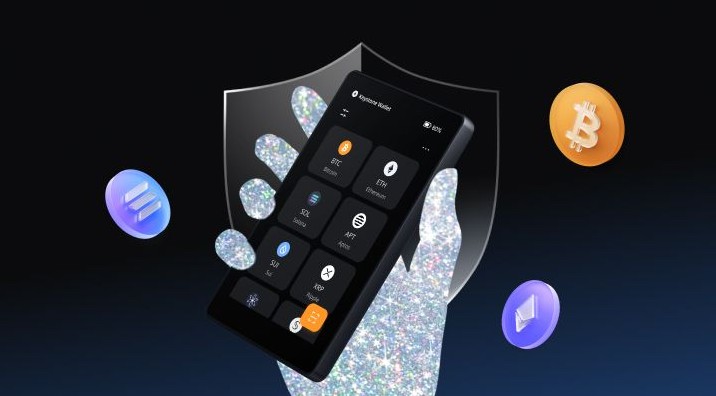
A screenless card can still generate a key, require a PIN, and resist some attacks. But you must trust the phone to show what the card signs. That is a different trust model from checking a trusted hardware display. Device attestation also has limits: it can show that signed firmware is genuine, but it cannot prove that nobody altered the circuit board before delivery.
Seed Phrases, Passphrases, and Key Derivation
Many hardware wallets use a hierarchical system. One master seed can derive many public addresses and their matching private keys. Standards such as BIP32, BIP39, and BIP44 describe parts of this process. A seed phrase is the human-readable backup used to recreate that key material, often as 12 or 24 words.
Seed facts worth knowing
- Anyone with the seed may be able to restore the wallet and control the funds.
- A written seed can be photographed, copied, stolen, misplaced, or coerced.
- BIP39 supports an optional extra passphrase that creates a separate wallet.
- A hidden passphrase can create travel, inheritance, or business accounts.
- The passphrase should be long, random, and kept apart from the visible seed.
- A standard seed may restore the same wallet on another compatible device.
- Two devices restored from the same seed still share the same seed-level risk.
A seed phrase is both a backup and a concentration of risk.
Portability is useful, but it can tie recovery to one phrase and one set of words. I would record the words in private, test recovery with a small amount, and keep the backup away from the hardware device. A written seed and the device in the same drawer are not two separate backups. They are one problem with two parts.
Cloned Devices, Seedless Cards, and Social Recovery
A second hardware wallet can hold the same wallet as the first, use an independent seed, or take part in a multisig setup. These options solve different problems. Tangem describes a seedless card model that generates keys inside a secure element and uses two or three backup cards. It removes the usual written seed, but recovery then depends on finding and protecting those cards.
Common backup models
- A cloned device restores the same seed for quick replacement.
- A separate device can hold different assets under an independent seed.
- Seedless cards split recovery across physical objects.
- A multisig setup requires several keys or devices to approve a transaction.
- Social recovery shares restoration authority with chosen guardians.
- A passphrase can separate accounts while using one device.
- Every model needs a tested recovery plan and a record of where its backups live.
More devices add backup paths, but they also add more setup work.
A cloned device speeds recovery after damage or loss, but it does not protect against someone finding the shared seed. Independent seeds spread that risk, though they create more balances and backups to track. Seedless cards and social recovery shift the problem rather than erasing it. You still have to protect the cards, access rules, guardian setup, or smart contract that controls recovery.
What to Compare for Key Security
Pages about hardware wallets worth comparing often start with price and coin count. Those matter, but they don't answer the security question. Start with the threats you care about: malware, a malicious dApp, a stolen device, a lost backup, coercion, a compromised seller, or failure at one vendor.
Security checks for the device
- Check whether keys are generated on the device.
- Check whether private keys can be exported.
- Find out whether signing runs in a secure element or a microcontroller.
- Look for a formal Common Criteria evaluation of the secure element.
- Check whether the device has its own trusted display.
- Review how much of the transaction intent the screen can show.
- Check whether the full firmware is open and auditable.
- Look for independent security reviews and public vulnerability reports.
- Check how firmware updates are authenticated.
- Look for tamper-evident packaging or physical tamper checks.
- Check how a lost device is protected by a PIN or access code.
Security is a system, not a single chip.
A certified chip can make physical key extraction harder. Open firmware can make the signing logic easier to inspect. Neither choice settles the whole design. I would also check update support, replacement parts, security disclosures, and the maker's response when a flaw appears. A long name does not replace a technical review, but support and clear notices still tell you something.
Coins, Tokens, Software, and Screen Quality
A long coin list can still miss the token or network you need. “Multi-chain” may mean native support or support through third-party software. Check the exact chain, token standard, wallet interface, and signing method. Compatibility with Bluetooth or USB says very little about support for the dApps and exchanges you use.
Compatibility questions
- Is the device Bitcoin-only or built for several chains?
- Are supported tokens native or added by companion software?
- Does it support standards such as ERC-20, BEP-20, or SPL?
- Are NFTs, DeFi apps, exchanges, and DEX flows supported?
- Which versions of iOS, Android, desktop systems, and browsers work?
- Does the phone support the required Bluetooth, NFC, or USB method?
- Can the screen show full addresses, token amounts, fees, and approvals?
- Can it show contract names and function selectors clearly?
- Is the companion app open source?
- Can the device receive the firmware and signature updates it needs?
The coin list is useful only when it includes the exact network and token you plan to use.
Bitcoin-only devices can reduce the number of chains, scripts, and interfaces they must handle. That can suit a Bitcoin-focused setup, but it will not fit someone who needs Ethereum or other assets. Multi-chain devices save space, yet they add more parsing, signing, and support work. The screen matters here too. A tiny display that hides the full request can push the decision back toward the host screen.
Ledger and Trezor Use Different Trust Boundaries
When people ask what is Ledger wallet , the short answer is a dedicated device that manages keys and signs transactions. A Ledger Nano crypto wallet is one example. Search labels such as hardware wallet Ledger and hardware Ledger wallet often point to the same product family.
Two common signing models
- Ledger's model places Ledger OS and signing inside a secure element.
- A separate controller handles USB, Bluetooth, and display communication.
- Adding a signature type may require support from the secure-element platform.
- Trezor's signing path uses its main microcontroller and auditable firmware.
- Some Trezor devices also use a secure element for access controls and secret protection.
- Open signing code can be reviewed, while chip hardening can resist physical attacks.
- The buyer still has to judge the full design, app, updates, screen, and backup model.
A certified chip limits physical key extraction. It does not decide whether a transaction makes sense.
In a cold wallet Trezor setup, the user still has to check the seed, firmware, app, and signing request. Ledger puts more of the signing boundary inside a certified chip. Trezor puts more signing logic in code that outside researchers can inspect. Both approaches have tradeoffs, so I would compare the exact model and its recovery rules rather than pick a brand name.
When Two Hardware Wallets Make Sense
A backup device can be useful when the first unit is lost, damaged, stolen, or out of service. If both devices hold the same wallet, the backup is fast but shares the same seed exposure. Devices with separate seeds can divide funds and failure points. They also give you more PINs, backups, locations, and recovery notes to manage.
Reasons to use more than one device
- Keep a cloned backup in a separate location.
- Hold different assets under independent seeds.
- Separate frequent trading from long-term storage.
- Run Bitcoin-only and multi-chain setups independently.
- Carry a small travel wallet.
- Keep business funds away from personal holdings.
- Teach and test with a device that holds only test funds.
- Use several devices as separate signers in a multisig system.
One backup device can replace failed hardware. Several independent devices can spread one failure across several systems.
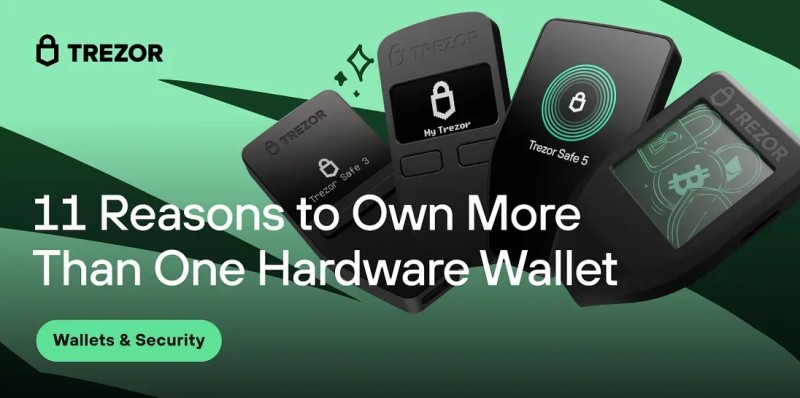
Multisig can require two or more devices to approve a transaction. The devices can sit with different people or in different places. That can block one stolen device from moving funds alone. It also creates a recovery risk: a wrong address, bad threshold, missing signer, or failed setup can lock everyone out. Record every signer, location, threshold, and recovery step.
A Two-Wallet Setup for Daily and Long-Term Funds
A common self-custody setup keeps a small hot balance for daily needs and most long-term assets in cold storage. The hot wallet handles the easy stuff. The cold wallet stays quiet until it is needed. This split does not remove risk, but it keeps a trading computer or frequent dApp session away from every long-term key.
Working funds in a hot wallet
- Trading and exchange withdrawals
- Payments and small transfers
- Short-term liquidity
- Frequent dApp activity
Long-term funds in cold storage
- Balances that do not need daily access
- Keys kept away from routine online activity
- Hardware-wallet accounts checked less often
- Assets covered by a tested backup plan
Treat online funds as working cash, not long-term savings.
For a business, the same split needs stronger controls. Use role-based access, withdrawal limits, approval layers, alerts, and records that match wallet balances. No single person should hold every device and every backup. Test the disaster plan before you need it. A backup that nobody can find or restore is just another piece of paper.
Buying and Setting Up Without Adding New Risks
The purchase itself is part of security. Buy from an official or trusted source, inspect the packaging, and check the model before setup. A seal can help with physical inspection, but signed firmware alone cannot prove that the circuit board was never modified. Hey, don't skip this part because the device looks simple.
Setup and daily safety checks
- Buy from a source you can trust.
- Inspect seals, model names, and firmware details.
- Use a clean computer or phone during setup.
- Keep the operating system and wallet software updated.
- Check every recipient, amount, fee, and contract action on the device.
- Do not rely on a phone or browser preview when the hardware screen can show it.
- Keep the seed or backup cards away from the device.
- Do not photograph a written seed unless a documented encrypted design allows it.
- Test recovery with a small amount or a written procedure.
- Keep backup objects in separate, controlled locations.
A hardware wallet is not a magic fix.
It reduces some risks and leaves others in place. A weak backup, hidden passphrase, bad update, or mistaken recovery step can still cause loss. For an estate, document where devices and backups live and explain any hidden wallet to the person who may need access. The full cost includes replacement devices, backup media, multisig hardware, and recovery planning.
Large Holdings and Social Recovery
A larger balance changes the threat. An attacker may have more time and money, so coercion, lab attacks, supply-chain tampering, and targeted phishing become more likely. One device, one seed, or one vendor can become a single failure point. Secure-element certification helps with physical attacks, but it does not cover the whole recovery system.
Questions for larger balances
- Which threats are most likely to target you?
- Does the secure element have a formal certification?
- Can outside researchers inspect the signing firmware?
- Can several vendors or locations approve a transaction?
- What happens if one device, seed, app, or vendor fails?
- How will an heir or executor prove ownership and recover access?
- Where are the backup devices or cards stored?
- Has the full multisig or recovery process been tested?
- Which legal and business records identify the wallet?
Recovery should not depend on one object, one person, or one vendor.
Social recovery spreads restoration authority among chosen guardians. Guardians can be people, other devices, or trusted accounts, and a set number must approve recovery. Three or more independent guardians can make a five-person, three-approval setup easier to reason about. Test them on a fixed schedule, verify identity beyond a phone number, and keep a hardware wallet as one guardian rather than the only path.
A Plain Process for Comparing and Buying
There is no universal winner for every setup. I would start with the assets, chains, and apps you need, then write down the threats and recovery duties you can actually manage. After that, compare the shortlist. The goal is not to find the longest feature list. It is to find a device whose signing, screen, backup, and update model you understand.
A simple buying process
- List the coins, tokens, networks, and apps you expect to use.
- Decide how much money belongs in hot and cold storage.
- Choose whether one seed, cloned backup, seedless cards, multisig, or social recovery fits.
- Compare secure-element or microcontroller signing.
- Check firmware source, audits, updates, and vulnerability reports.
- Test the screen with the transaction types you expect to sign.
- Confirm phone, computer, exchange, and dApp support.
- Include backup and replacement costs in the budget.
- Buy from a trusted source and inspect the device.
- Test setup, signing, and recovery before making it your main wallet.
A device you cannot recover is not a safer setup.
If the seller cannot explain the backup, signing boundary, update path, or screen, I would walk away. Once the device arrives, I would check the seals, verify the firmware through the maker's official flow, recover on a clean device, and send a small test transaction. That hands-on check tells you more than a wall of product claims.










Comments on “How Crypto Hardware Wallets Work: What to Compare Before Buying”
No comments yet. Be the first to share your thoughts.