What Is a Cryptocurrency Mobile Wallet
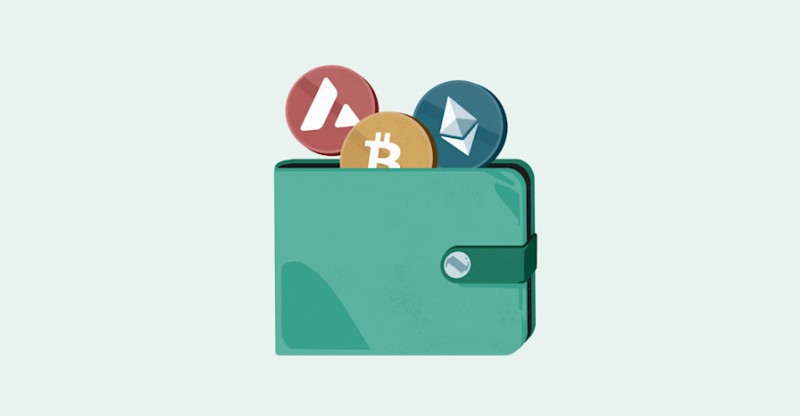
A cryptocurrency mobile wallet is an app you install on your phone. It manages the keys that let you access your coins on the blockchain. The wallet itself does not store the coins - those live on the blockchain, a distributed ledger. The wallet holds or manages the keys you use to authorize transactions. You can send crypto to another address, receive it at your public address, view balances and history, sign transactions with your private key, and connect to blockchains to confirm a transaction went through. Some wallets also let you buy, exchange, stake, or manage supported assets.
Mobile wallets run on iOS and Android. They give you access to your digital assets through your phone - no computer needed. Depending on the provider, a mobile wallet may be used to store, send, receive, monitor, buy, exchange, or stake cryptocurrency. I like that I can check my balance while waiting in line for coffee. It's practical.
Public Keys, Private Keys, and Wallet Addresses
Every wallet uses a pair of cryptographic keys: a public key and a private key. The public key is a long string of random numbers you can share. It works like a bank account number - people use it to send crypto to you. A wallet address is a compressed or encoded form of the public key. The private key must stay private. Anyone who gets it can control your funds. This is why you should not share your private key with an exchange, wallet provider, or anyone else unless the wallet design intentionally relies on a third-party custodian.
Not your keys, not your coins.
A seed phrase or recovery phrase backs up your wallet's keys. It can restore access if you lose your device, app, or private-key storage. Some wallets use 12 words, others 24. The process is similar across providers, but you must follow the instructions for your specific wallet software. Passwords, private keys, seed phrases, and biometrics do different things. A password or PIN protects access to the wallet app. A private key authorizes transactions. A seed phrase restores the wallet after loss. Fingerprint or Face ID can unlock the app when the provider supports it.
Custodial vs Non-Custodial Wallets
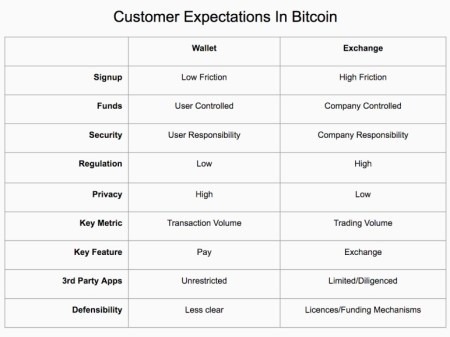
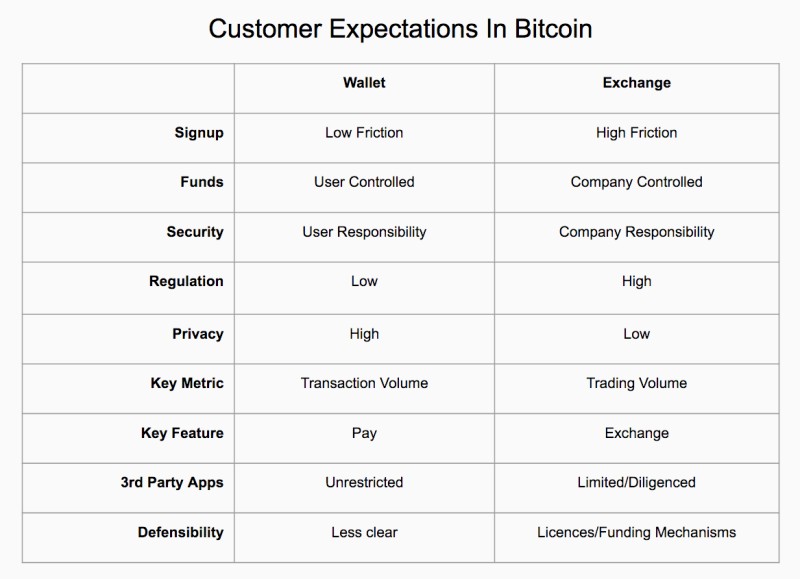
A hosted wallet is a custodial wallet provided by an exchange. The exchange holds your private key online. If you leave Bitcoin or Ethereum on Coinbase or Kraken, you're using a hosted wallet. These are simple to set up and the provider manages the key. Password recovery is easier because the exchange may help restore access. But the key being online means greater exposure to hacking. Some hosted wallets may not support every transaction type, like buying an NFT with assets on the exchange.
A non-custodial wallet leaves the private key under your control. No third party is needed to authorize transactions or restore the wallet. These often provide more freedom and features - NFT support, staking, access to decentralized apps. But control transfers responsibility to you. If you lose the private key or seed phrase, the provider generally cannot restore the wallet. If the private key is exposed, your funds may be at risk.
Key differences
- Custodial: exchange holds your key, easier recovery, more hack exposure
- Non-custodial: you hold your key, full control, you are responsible for backups
- Software wallets can be either custodial or non-custodial depending on design
- The custody arrangement must be checked for each specific provider
Hot Wallets for Frequent Use
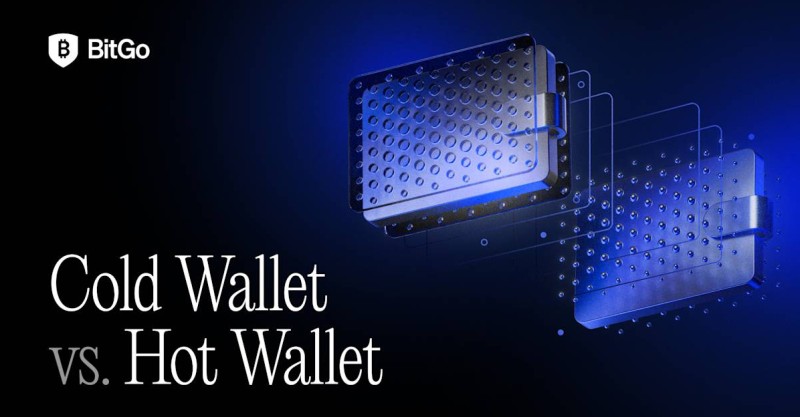
A hot wallet connects to the internet. This makes it convenient for frequent transactions, trading, payments, and day-to-day management. Hot wallets are usually free to download - mobile apps, desktop applications, or browser extensions. They may be hosted by an exchange or operated by a third-party provider. Internet connectivity creates exposure to weak passwords, phishing, malware, compromised apps, and attempts to steal private keys. Their convenience also makes them less suitable for storing large amounts over long periods.
One security practice is to keep only a small operational balance in a hot wallet. The bulk of a portfolio goes in cold storage. A hot wallet handles regular trades, services, payments, or transfers between platforms. A cold wallet holds significant long-term balances. Two-factor authentication adds protection by requiring a second piece of evidence, like a code on your mobile device. Strong passwords, updated software, phishing awareness, and limited balances help too.
More than $2.2 billion worth of cryptocurrency was stolen in 2024 according to Chainalysis reporting. Compromised private keys accounted for nearly half of those thefts.
Examples of software wallets for particular ecosystems include MetaMask for Ethereum, Phantom Wallet for Solana, and Blue Wallet for Bitcoin. Trust Wallet supports a wide range of cryptocurrencies in mobile and browser-extension forms. Coinbase Wallet is also a hot-wallet example. If you're looking for the best hotwallet for your needs, consider what chains you use and what features matter.
Cold Wallets and Offline Storage
A cold wallet keeps private keys offline. It's commonly used for long-term storage or high-value holdings. The primary security benefit: an internet attack cannot directly reach a key that's not connected to the network. Cold wallets may be hardware devices, air-gapped signing devices, paper records, offline desktop systems, or keys held by a qualified institutional custodian. A cold wallet is not necessarily unusable for transactions - it may connect to a computer or phone only when a transaction needs signing.
Hardware Wallets
A hardware wallet is a physical device that stores private keys offline. Many look like USB drives, others like car key fobs or cards. Ledger and Trezor are named examples. Security features may include PIN codes, encryption, built-in screens, biometric authentication, and tamper-resistant construction. Private keys are generated and stored offline. When you authorize a transaction, the device connects to a computer or mobile device, and you confirm it on the hardware wallet. This isolates the key from the internet during ordinary storage.
Hardware wallets support multiple cryptocurrencies and are often used by long-term investors or people holding substantial balances. Disadvantages include purchase cost, possibility of physical loss or damage, and the need to protect a recovery seed. If both the hardware wallet and its recovery seed are lost, the cryptocurrency may be unrecoverable. Popular hardware wallets should be purchased from a verified seller, not the second-hand market. Companion software should be downloaded from the provider's official website.
Hardware wallet considerations
- Buy from verified seller only
- Download companion software from official website
- Protect the recovery seed - it's as important as the device
- Cost typically $50 to $200
Air-Gapped Devices and Paper Wallets
Some cold wallets never connect to the internet. A transaction is prepared on an online device, details transferred to the cold wallet via QR code or flash drive. The cold wallet verifies and signs offline. The signed transaction goes back and gets broadcast separately. The private key itself never goes online.
A paper wallet is a physical document with a public key and private key. The public key may appear as a QR code or alphanumeric string for receiving funds. The private key authorizes transfers. Keys should be generated offline, often with open-source software, then printed. Multiple copies or tamper-evident packaging can help. The private key must be concealed and stored securely. Paper resists online attacks but introduces physical risks - fire, water, damage. Manual entry of long keys risks typing errors. A lost or stolen paper wallet generally cannot be recovered without another backup.
Security descriptions differ. One overview presents paper wallets as most secure because keys are offline. Another calls them low-security because they're low-tech and depend entirely on physical storage. Consistently cited concerns: online resistance, physical loss, damage, manual-entry errors, no provider-assisted recovery. I'd say paper wallets are an option but not my first choice for anything significant.
Offline Desktop Wallets
Desktop wallets are applications installed on a computer. Some can operate without internet and provide cold storage by keeping private keys locally. Others are continuously connected and exposed to malware and hacking. The distinction depends on the application and how you operate it. Desktop wallets can generate addresses, initiate transactions, display balances, and show history. The computer should have current antivirus and firewall. Private keys and backups should be in encrypted storage or password-protected files, with regular backups.
Combining Hot and Cold Wallets
A hot and cold wallet system separates everyday liquidity from long-term holdings. A small operational balance stays in a hot wallet for quick access, regular trades, payments, and transfers. The majority stays offline in a cold wallet. This gives faster access to a limited amount while protecting long-term assets from internet-based attacks. The approach doesn't remove every risk. Cold wallets can still be lost, stolen, or damaged. Hot wallets remain exposed online. The hot balance should be limited to what you need for active use.
For institutions, the hot/cold mix is based on transaction velocity, settlement needs, and internal risk thresholds. Hot wallets may hold daily operating liquidity with a small buffer. Cold wallets hold significant long-term assets. Institutions may restrict hot-wallet access to authorized users, require role-based approvals, set withdrawal limits, use multifactor authentication, enable monitoring and real-time alerts, and require separate approval layers for large transfers. Security may take priority over withdrawal speed when moving large amounts out of cold storage.
Disaster-recovery planning should include backup seed phrases, restricted access protocols, and qualified third-party custody where applicable.
Mobile Wallet Advantages and Risks
Mobile wallets are designed for frequent access to digital assets. Advantages: manage crypto while traveling, convenient access through internet connection, broad availability for smartphones and tablets. Quick access to balances and history, QR-code support for transfers, fast payments when both wallet and recipient support them. Biometric controls - PIN codes, fingerprint, face recognition. Built-in backup and restore features. Ability to buy, sell, or exchange supported assets. Support for staking, NFTs, and decentralized apps when offered by the provider.
Some mobile wallets allow payments by tapping your phone. Many support QR codes, scanned instead of manually entering an address. Useful for face-to-face payments and travel. But device dependency creates risks. A lost or stolen phone may expose access to the app. Mobile devices are vulnerable to malware and hacking if security is compromised. Some wallets are incompatible with particular phone models or OS versions - check compatibility before installing. A weak phone lock, malicious app, or compromised OS can expose a hot wallet. Losing the phone doesn't necessarily mean losing assets if the seed phrase was backed up, but you must have a secure recovery method.
Additional security features like two-factor authentication, app locking, biometric authentication, and timely software updates reduce risk. A reputable provider that regularly updates its software matters because vulnerabilities may be patched in later versions. When choosing a best secure crypto wallet , update frequency is a signal worth watching.
Mobile, Extension, Desktop, and Web Wallets
Mobile wallets are software apps installed on a smartphone. They need internet to reach a blockchain and are available for most modern phones. Hundreds offer different supported assets, interfaces, features, and security models. Examples: MetaMask for Ethereum on iOS and Android; ONTO Wallet, a multi-chain wallet on mobile and browser extension; Trust Wallet, a decentralized wallet supporting many cryptocurrencies with open-source code.
Browser-extension wallets install as extensions and require a desktop or laptop. MetaMask works on Chrome, Firefox, Brave, Edge. ONTO Wallet on Chrome and Firefox. Trust Wallet's extension is Binance-owned for Chrome, Firefox, Brave, Edge. Extension advantages: better separation from mobile device, lower exposure to phone theft, easy access from a computer with internet, broad browser compatibility. Disadvantages: depends on the browser, changing browsers may need reinstall, some offer fewer features, lost seed phrase still causes loss of access, access through another computer doesn't eliminate seed phrase protection needs.
Wallet type trade-offs
- Mobile: convenient, phone-dependent, malware and theft risk
- Extension: computer-based, browser-dependent, phishing risk
- Desktop: direct control, computer is security environment, can be offline for cold storage
- Web: no install needed, keys often on provider servers, phishing and provider failure risk
Desktop wallets run on a computer and give direct control over the wallet software. Stronger control than a hosted exchange wallet, but the computer becomes part of the security environment. Antivirus, firewall, updates, encrypted backups, secure password storage matter. A desktop wallet can be online for frequent use or offline for cold storage. Less convenient than a phone but stronger isolation for long-term holdings.
Web wallets operate through a browser, accessible from computer or phone without a full app install. They provide interfaces for sending, receiving, and converting crypto. Many store private keys on the provider's servers, so security depends on the provider's controls. Risks: hacking, phishing, malicious sites, weak login credentials, provider failure. A fake site may imitate a legitimate wallet and ask for credentials or keys. Reputable providers, two-factor authentication, password updates, and careful use of official websites help.
Choosing a Mobile Wallet
The best wallet depends on your experience, trading frequency, asset size, risk tolerance, and preferred balance between convenience and security. Security is primary - examine authentication options, key custody, encryption, backup procedures, update history, provider reputation. Fees matter - transaction fees may be automatic for speed or customizable to reduce cost, with lower fees potentially meaning slower transactions. Supported cryptocurrencies or networks must match your required assets and ecosystems.
Ecosystem features drive selection too. Staking support for proof-of-stake assets. NFT support for token management. Buying and exchange capabilities vary - some wallets have built-in services, others only store, send, and receive. Customer support quality varies - some offer 24/7 assistance with varying response times. Convenience: mobile suits frequent payments and travel; desktop or hardware may suit those prioritizing isolation. Compatibility: check OS requirements, supported blockchains, browsers, devices.
Ultimately, evaluate backup and recovery options to ensure the wallet can be restored if a phone is lost or an app fails. Cost considerations: mobile wallets are often free, but hardware devices and custodial services may have fees. Research the provider's track record and reputation - read reviews, check the team behind the wallet. Compare custody models to understand who controls the private key. Consider your risk tolerance and usage patterns - frequent traders may prioritize quick access, while large or long-term holdings may justify stronger offline protection. If you're wondering how to find a crypto wallet that fits, start with your threat model.
Wallet Examples and Platform Features
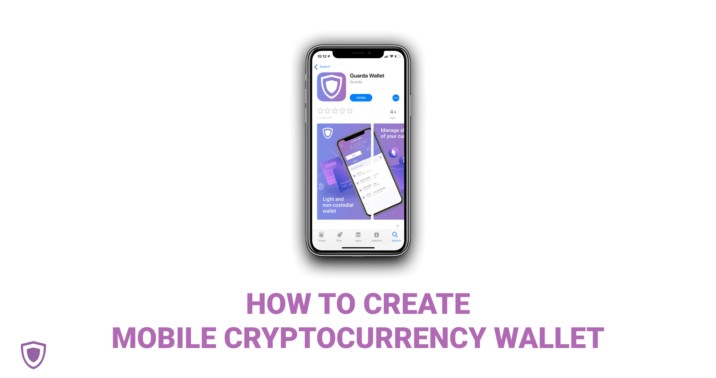
Guarda mobile wallets for iOS and Android offer non-custodial storage, a built-in exchange, and features for supported coins and tokens. Guarda states its wallets are free, don't require personal information, and give you control over the wallet backup. They cannot access your password or backup and therefore cannot restore a non-custodial wallet after loss. As of the guide's update, Guarda stated its mobile wallet could manage more than 40 major blockchains and more than 10,000 tokens.
The Tangem Mobile Wallet lets users create a free, self-custody wallet directly in the app. Tangem also offers a card-style hardware wallet. Tangem AG states it provides hardware wallets and non-custodial software solutions, is not regulated as a financial-services provider or exchange, does not hold or control user assets or transactions, and uses third-party providers for transaction services.
MetaMask is a popular Ethereum wallet on mobile and as a browser extension for Chrome, Firefox, Brave, Edge. ONTO Wallet is an easy-to-use decentralized multi-chain wallet with access to more than 900 decentralized applications, available on mobile and as a browser extension for Chrome and Firefox. Features include NFT management, cross-chain swaps, decentralized app access, an ONT decentralized identifier, one-click multi-chain address creation, and encryption for private data protection.
Trust Wallet is a secure, decentralized wallet supporting many cryptocurrencies. Its code is open source. Its browser extension is Binance-owned. Phantom Wallet is designed for the Solana blockchain. Blue Wallet is designed for the Bitcoin ecosystem.
N26 Crypto is a custodial service integrated into the N26 banking app, described as beginner-friendly, keeping traditional and digital currencies in one application. It supports almost 200 cryptocurrencies including Bitcoin, Ethereum, and Cardano. Users can begin trading with as little as €1. Fee structure: 1.5% for Bitcoin, 2.5% for other cryptocurrencies. Fees may be higher for special coins, lower for N26 Metal users. N26 partners with Bitpanda Asset Management GmbH for trading services - a regulated custodial environment where crypto is held in Bitpanda-managed storage. Fees and prices are set by Bitpanda, not N26. This differs from non-custodial where you directly control the private key.
For Cardano and ADA, Daedalus is a full-node desktop wallet that downloads the entire Cardano blockchain and independently validates transactions. Features include wallet backup, staking, delegation, voting, and offline storage through paper-wallet generation. For hardware storage of ADA: Trezor Model T, Ledger Nano S Plus, Ledger Nano X. Other wallet names include Nami Wallet, Flint Wallet, Atomic Wallet, NuFi Wallet, AdaLiteWallet, Eternl (previously CCVault), Typhon Wallet, Guarda Wallet, Begin Wallet, Gero Wallet, Ellipal, Tangem Wallet, Vespr Wallet, and Lace.io.
Setting Up a Mobile Wallet
Setup varies by custody. An account-based or custodial wallet may request personal information and use a password or two-step verification. A non-custodial wallet usually doesn't require personal information or email and instead relies on local key creation and a private-key or recovery-phrase backup.
The mobile setup process generally involves several steps. First, select a reputable wallet that supports your assets and phone. Install the application through the App Store or Google Play and open it. Create a new wallet or account and set a strong password or PIN. Enable available security features like biometrics or two-factor authentication. Write down and securely store the recovery phrase or wallet backup. Confirm that the wallet address, asset network, and recovery information belong to the intended wallet.
Guarda provides a specific six-step example: go to the App Store or Google Play and find the Guarda Wallet application. Install and open it. Click "Create a new wallet." Create a strong password. Read the security information and download the cryptocurrency wallet backup. The mobile wallet is created and ready to use. The password should not consist solely of dictionary words - combine letters, numbers, and symbols. A password manager can generate and store a unique password, but the wallet's recovery phrase still needs separate physical protection.
The backup is essential for restoring access to funds. In Guarda's system, the wallet can be unlocked with the backup and password or with the backup and fingerprint or Face ID. The backup should be stored securely and out of public view. Guarda states its wallets are non-custodial - the provider does not have access to your password or backup and cannot restore the wallet if you lose them. This differs from a hosted exchange wallet where the exchange may retain key information and assist with account recovery.
The Tangem Mobile Wallet is simpler: a free, self-custody wallet can be created directly in the Tangem app. For hardware wallets, get the device from a verified seller, not the second-hand market. Download required companion software from the provider's official website. If you're researching how to create a personal crypto wallet , the non-custodial path gives you full control from day one.
Backups, Passwords, and Recovery
A mobile wallet should be backed up according to its software instructions. Bitcoin wallets commonly ask for a 12-word phrase, some use 24 words. Words must be recorded accurately and kept in a secure location. A backup protects against phone failure, accidental deletion, application problems, or loss of the original device. It does not protect against every event. A backup stored on the same phone, in an exposed cloud account, or in a publicly visible location may not provide meaningful security. Paper records can be protected through multiple copies or tamper-evident storage but remain vulnerable to physical damage and loss.
Non-custodial wallet providers generally cannot restore a wallet from a user-controlled key because they don't hold the key. This is why losing both the device and the seed phrase can result in permanent loss. Custodial providers may be able to restore an account because they control or have recorded the necessary credentials. Hardware wallets also rely on recovery seeds. The device itself is not the only required backup. Don't depend on the physical device being found after it's been lost or damaged.
A password protects access to the application but doesn't necessarily replace a seed phrase. Biometrics can make local access easier but also depend on the security of the phone and its biometric configuration. If you're figuring out how to get a wallet for cryptocurrency , understand that the backup step is not optional - it's the only way back if things go wrong.
Sending, Receiving, and Wallet Services
To receive cryptocurrency, share the wallet's public address or QR code with the sender. The public key can be shared without exposing the private key. The sender transfers the asset to that address, and the wallet's blockchain connection detects the balance change after the transaction is recorded.
To send cryptocurrency, get the recipient's wallet address, open the wallet, select the asset, enter the amount, review the fee and destination, and submit. The wallet signs the transaction with the private key. Nodes verify it, and it's recorded permanently on the blockchain. A completed blockchain transaction cannot be reversed by simply asking the recipient to return the funds. QR codes reduce manual-entry errors - a mobile wallet may scan a code instead of requiring you to type a long address. Some apps display the destination address and associated name during the transfer flow.
Fees affect mobile transactions. Wallets may estimate fees automatically for faster processing or allow customization. A lower fee may take longer to confirm. Mobile wallets can show date, time, amount, transaction type, fee, destination, confirmation count, and status. Depending on the provider, a mobile wallet may offer additional services: buying and selling crypto, exchanging one asset for another, staking. Wallets may also support NFT displays, decentralized applications, cross-chain swaps, and token management. Address books, transaction history, balance displays, and QR-code payments are common.
Staking means locking or committing cryptocurrency to support a blockchain network in exchange for rewards. Non-custodial wallets may provide staking controls because the user retains the keys. Custodial services may offer staking without exposing the private key. If you use a cryptocurrency software wallet with staking built in, you can earn rewards without leaving the app.
ENS Names in PayPal and Venmo Transfers
The Ethereum Name Service was integrated into PayPal and Venmo. The integration allows users to send and receive cryptocurrency through Venmo, PayPal Mobile, and PayPal Web. A user can enter an ENS name in the transfer search field rather than manually entering a long wallet address. The PayPal system resolves the ENS name to the wallet address associated with the blockchain being used. The ENS name and corresponding address remain visible during the transfer flow, allowing the user to distinguish the intended destination.
The ENS integration is intended to simplify address management and reduce errors. It does not replace the need for the user to distinguish the correct recipient or blockchain network. PayPal and Venmo also introduced an Address Book for cryptocurrency transfers. Users can save frequently used wallet addresses, recall recently used addresses, and store ENS names alongside traditional wallet addresses. The feature works for transfers to friends or payments to businesses, operating similarly to contacts used for internal PayPal or Venmo transfers.
Blockchain Data and Wallet Application Operations
Building a cryptocurrency wallet application involves provisioning and managing blockchain nodes, creating secure private-key management, building transaction-management modules, signing transactions, tracking transaction status, and processing blockchain data pipelines. Amazon Managed Blockchain Access provides a managed gateway for connecting applications to public blockchain networks like Bitcoin and Ethereum. Amazon Managed Blockchain Query provides indexed current and historical blockchain data through API calls. Together they can retrieve balances, submit transactions, monitor progress, check confirmations, and determine whether a transaction has been included in a block.
AWS CloudHSM and AWS Key Management Service are presented as secure key-management services for wallet applications. CloudHSM provides a cloud-based hardware security module that is FIPS 140-2 Level 3 certified. The design allows users to generate private keys and store them within CloudHSM, restricts access to authorized users, and relies on multiple availability zones to help protect against system failures. AWS KMS manages cryptographic keys in a cloud environment and can securely store and access private keys.
A wallet adds a cryptographic signature to a transaction using the private key. The signature shows the transaction is valid and hasn't been tampered with. After submission, the wallet must retrieve transaction records and determine progress, confirmation count, block inclusion, and final status. A production mobile wallet may combine a secure signing component, an application interface, public-address generation, a blockchain-data connection, transaction-history storage or retrieval, and balance display. The same services can support NFTs, gaming, decentralized finance, and decentralized autonomous organizations.
Security Features and Practices
Security is an ongoing responsibility because the blockchain itself doesn't protect a private key stored on a compromised or exposed device. Wallet passwords should be long, unique, and difficult to guess. Avoid dictionary words, combine letters, numbers, and symbols. A password manager can create and store unique passwords for different services. Reusing a password across services increases exposure if one service is compromised.
Two-factor authentication requires a second verification factor, like a code generated on a mobile device. It can protect an account even if a password is exposed. Fingerprint and Face ID provide convenient local access. PINs, device locks, and authentication settings add further protection. Biometrics don't replace the need to protect the seed phrase. Wallet software and phone operating systems should be kept current - updates may patch vulnerabilities and improve security. A reputable mobile-wallet provider should release updates regularly. Desktop and mobile devices should also use current antivirus and firewall protection.
Security checklist
- Strong unique password, not reused anywhere else
- Two-factor authentication enabled
- Biometrics for local access convenience
- Software and OS updates applied promptly
- Antivirus and firewall on desktop devices
- Seed phrase backed up offline, multiple secure locations
- Small hot-wallet balances, bulk in cold storage
- Verify URLs, never enter seed phrase on unverified sites
Mobile and desktop wallets can be exposed to malware, especially if the OS or another installed app is compromised. Antivirus, firewall, device locking, and current software are protective measures. Hardware wallets reduce exposure to online malware when the private key remains isolated in the device. Phishing can involve a fake wallet website, a fraudulent support message, or an app designed to capture credentials or seed phrases. BitGo describes phishing as a leading attack vector. Verify the destination site and avoid entering a recovery phrase into an unverified form. Passwords, private keys, and seed phrases should not be treated as ordinary login credentials.
The seed phrase should be backed up and protected against loss. A user who loses the device and the seed phrase may lose access permanently. The recovery phrase should be kept in a secure location and not exposed in public. Multiple physical copies or tamper-evident storage can help with paper backups, though copies must themselves be protected. A hot wallet should contain only the amount needed for regular transactions. Significant or long-term holdings are better suited to cold storage. Exchanges may be convenient for trading but are not ideal for long-term storage of large amounts.
Wallets may use strong encryption for private keys and transaction data. AES-256 is a high-standard encryption option. Hierarchical deterministic wallets can generate a new address for each transaction, reducing address reuse and making it harder to link transactions through repeated addresses. Multi-signature wallets require multiple private keys or authorizations before a transaction can execute, preventing one person from having complete control. Desktop private keys and backups can be kept in encrypted storage or password-protected files. Backups should be made regularly. A desktop wallet connected to the internet remains vulnerable to malware and online attacks, while an offline desktop workflow can provide cold storage.
For institutional wallets, a single person should not have full control over all assets. Role-based access should limit each user to necessary operations. Large transfers should require additional approval layers. Withdrawal limits, multifactor authentication, real-time alerts, transaction monitoring, and documented governance can control hot wallets. Separate wallets can be tracked as individual accounts and reconciled against internal records.
Risk and Custody Disclosures
A wallet provider should be evaluated according to who controls the key, what recovery assistance is available, how assets are stored, and what protections apply if the provider fails. N26 states its cryptocurrency service is custodial through Bitpanda Asset Management GmbH - user assets and private keys are managed by the custodial provider rather than controlled directly through a non-custodial seed phrase.
Tangem states it does not hold, custody, or control user assets or transactions. It also states it is not a regulated financial-services provider or cryptocurrency exchange, and that transaction services are provided by third parties. BitGo states that digital assets in its custody are not guaranteed by BitGo and are not subject to FDIC or SIPC protections. It also notes that custody and other digital-asset services may be subject to jurisdictional, regulatory, eligibility, and product-availability restrictions.
Cryptocurrency prices can fluctuate significantly, and an asset can become worthless. A complete loss of principal is possible. Because blockchain transactions are permanent, a transaction sent to an incorrect address generally cannot be reversed. Because private keys and recovery phrases control access, a compromised or lost key can result in permanent loss even when the underlying blockchain and transaction records remain intact. This is the reality of self-custody - freedom comes with no safety net.
The shorthand "Not your keys, not your coins" expresses the distinction between assets controlled through a user's own keys and assets held by a third-party custodian.
If you're holding a wallet crypto coin long-term, cold storage is the sensible path. If you're actively trading, a hot wallet with tight limits makes sense. The crypto currency wallet you choose should match how you actually use it - not what marketing says. And if you're exploring treasure wallet crypto options for cold storage, hardware wallets from verified sellers are the standard approach. Don't skip the backup step. Ever.





Comments on “Your Cryptocurrency Mobile Wallet Guide: How to Set Up and Choose Between Hot and Cold Storage”
No comments yet. Be the first to share your thoughts.